Advertisement
Best 5 Android, iOS Tablets To Buy in India in 2014
Even a few years ago, tablet devices were not the most regular thing among users since most of them were not even aware about the existence of such a technology. However, with more and more big names such as Apple and Samsung finally coming to the front, tablets have started flowing in with more and more people adopting the same.As of now, while the Apple-made iPads are the most popular of all, providing the best app selection, there are still plenty of great Android alternatives that effectively look to bump up the competition.
But then, making a choice is one of the most difficult things ever to do, and especially when you are spoilt for choices in the smartphone market. Do you join the rest of the world and get yourself a new Apple iPad? Or do you jump on the Android bandwagon where the choice diversifies even more?
We take a look at the top 5 tablet devices that you could look to invest on this year.
Apple iPad Mini Retina

As expected, Apple will surely be a highlight of this list for its iPad range of tablets that have been subjected to so much popularity all over the planet in the past few years.
The iPad Mini Retina could be considered one of the best tablets to buy for anyone looking for a compact and a lighter version of the iPad Air without taking away much from the screen quality, performance and battery-life.
Google Nexus 7 (Second Generation)

The new Nexus 7 tablet takes command over the the original 7-inch offering from Google back in 2012. The device comes packing a 1.5Ghz quad-core processor, 2GB of RAM and comes with either 16GB or 32GB of storage.
The 2nd gen Nexus 7 is easily one of the best choices if you are looking to buy a great 7-inch Android tablet in India. The pure Android the device runs offers a smooth UI, alongside a high resolution screen that offers a great experience for browsing and gaming alike.
Amazon Kindle Fire HDX 7

Amazon may have entered the tablet race much later compared to its more illustrious rivals, but that doesn't take away anything from the fact that the company makes few of the amazing pieces of tablet hardware that currently graces the planet.
While we are guessing that a regular Amazon-made tablet will not catch that much attention among fans, especially with the likes of Apple and Samsung around. But if you are all too interested in Amazon's ecosystem, the Kindle Fire HDX 7 is a great purchase.
Sony Xperia Tablet Z

Speaking about good looking devices that not only offer a great experience, but also are objects of beauty, the Sony Xperia Tablet Z is a perfect example from Sony as to what happens when you combine the phone with a tablet.
The Sony Xperia Tablet Z is one of the best built Android tablets to be around in India. The device is quite slim, although powerful and even weatherproof. The device also offers crisp, high-resolution display.
Apple iPad Air

There's hardly any surprise that two of Apple's tablet offerings have made it to the list. While the previously discussed iPad Mini with Retina is already a great purchase, the more celebrated iPad Air, for many, is the kind of stuff dreams are all about.
The iPad Air, which Could be easily tagged as one of the best tablet offerings to be available in India, arrives with a host of improvements made to almost everything that's inside the tablet device.
We hope Apple “borrows” features of Android and Windows for iOS 8
Apple's first major keynote of the year is just over a week away, and it's all but certain to give us our first official look at the next versions of OS X and iOS. We've already outlined some changes we'd like to see in Apple's desktop operating system, but the new version of iOS is going to affect far more people.All of the major mobile operating systems borrow heavily from each other these days, so we looked at our Android and Windows phones to find features that we hope will "inspire" Apple's software designers. We'd honestly be surprised to see Apple implement all of these—the company takes a very careful approach to new features, and it tends not to add new features for the sake of adding new features. In any case, this is a list of the things we miss most when we jump back to iOS after spending time with Android or Windows Phone 8.1, and we think Apple would be able to find a way to implement them without making iOS needlessly confusing or complex for users.
Customizable quick settings (Windows Phone 8.1)

Control Center is one of our favorite additions to iOS 7. It gives you instant access to a handful of hardware and playback settings, and even if it didn't change at all in iOS 8 it would still do most of what you'd need it to do.
There's always room for improvement. Take Windows Phone 8.1's new "Quick Actions" feature, which puts a row of quick settings across the top of the screen when you pull down the Notification Center shade. Windows Phone actually fits fewer shortcuts than iOS does—four, instead of the 13 or so things you'll find on Apple's version—but those four shortcuts are fully customizable by the user. iOS' defaults are going to be perfectly fine for most people, but being able to tweak those settings to incorporate the ones you use the most often will make it even more useful.
Intents (Android)

One of iOS' longstanding limitations is that third-party applications can only interact with one another in limited ways. Certain services that have been blessed by Apple (Facebook, Twitter) can do a little more now that they're integrated into the operating system. Most applications still live in their own little sandboxes.
Android's "intents" system seems like an elegant way to solve this problem without introducing too much extra insecurity or complexity. In case you're not familiar: in Android, third-party applications can tell the OS that they're capable of certain things—uploading an image, for example, or opening a webpage. When you tap the "share" button on an image or click a link, the operating system can then present you with a full list of all first- and third-party applications that are capable of doing what you want.

iOS currently offers a very limited version of this for certain files via the "Open In" menu—I can take a document from Dropbox and open it in Office Mobile or Pages. But I can't then send that file back to Dropbox. It either needs to live in Microsoft's or Apple's cloud until I can get back to a computer with more robust file management capabilities.
Rumors indicate that something not unlike Intents is coming to iOS 8, and we'd be glad to see it. It's a logical extension of the existing Share menu that would make iPhones and iPads more flexible.
A more useful Home screen (Android and Windows Phone 8.1)

iOS 7 was a big design overhaul, but one thing hasn't changed at all: the Home screen is still a static grid of icons. It's a hub you use to jump from app to app, but aside from those little red notification badges it doesn't really do much by itself. This is in contrast to both Android and Windows Phone, which use widgets and Live Tiles (respectively) to offer up snippets of information at a glance. Apple's line has always been that putting any kind of widget or Live Tile equivalent on iOS would be too much of a drain on the battery, and while we think this argument is a little facile, the company hasn't budged on the issue in seven years.
That doesn't mean we're going to stop asking, though. Microsoft's Live Tile model could be adopted without drastically disrupting iOS' icons-on-a-grid design approach. We even know that icons can be designed to be more dynamic—Apple's Calendar and Clock icons always show the current date and time, respectively. Let third parties get in on the fun.
iOS 7 did introduce the "Today" view in the notification center, which offers some information at-a-glance—the weather, some data on how long it would take you to get home from where you are, the day's appointments and reminders, and information about your stocks if you have them. Like so many other things about iOS, the Today view is made less useful than it could be by its inability to incorporate information from apps other than Apple's.
Gesture typing (Android and Windows Phone 8.1)

It may have started life as a niche feature, but Swype-style gesture typing has invaded the default keyboards for both Android and Windows phones. On Android it's been a part of Google's stock keyboard since version 4.2 and it's a default feature in most OEM handsets, and Microsoft introduces the feature to its stock Windows Phone keyboard in the 8.1 update. It takes some getting used to, but gesture typing is quite a bit faster than the traditional two-thumbed tapping that iOS has always used and continues to use.
iOS' keyboard in general is an area where Apple is lagging behind Google and Microsoft (though the company would probably argue that it's opting to keep things simple, not lagging behind), and the list of inadequacies is getting pretty long. It lacks good predictive typing, gesture typing, and even an unambiguous Shift key. Apple may have contributed a lot to the modern software keyboard, but it's starting to feel a little behind the times.
A more capable Siri (Android and Windows Phone 8.1)

Here's another area where Apple sparked interest in a feature but then fell behind its competitors. Using Siri today is basically the same as using Siri in iOS 5 three years ago. Press the Home button, talk to your phone, and your phone will do what you want.
Both Google Now and Microsoft's Cortana outdo Siri by trying to give you information before you ask for it. You can tell Cortana all kinds of things about yourself that helps hone its recommendations. Google Now looks at your e-mails and seamlessly delivers information about flights, packages, movies, and directions. Siri isn't bad when I know what I want, but I'd like a personal assistant that can tell me what I want before I even have to ask.
Five iOS 7 Cydia Tweaks That Bring Android Features to iPhone
The official iOS 7 jailbreak has been available for a while now, and we’ve been taking some time to play around with a lot of jailbreak tweaks (old and new) for iOS 7 and seeing which ones are worth your time.We’ve already discussed and featured a ton of iOS 7 Cydia tweaks in the past that dramatically improve the iOS 7 experience, but we’re back with even more. Since jailbreak developers are constantly updating and releasing new tweaks that are compatible with iOS 7, we figured it was time, once again, to tell you about some of the best iOS 7 Cydia tweaks that we’ve found.
This time around, however, we’re focusing on five jailbreak tweaks that are specifically aimed at iPhone users wanting some of the great features that Android devices are known for.

Just like with our past article on jailbreak tweaks for Google users, we’re guessing that there are a lot of iPhone users who also enjoy Google’s products, and we don’t blame them for wanting the best of both worlds when it comes to iOS and Android features. Here are five jailbreak tweaks that you should check out if you’re one of these users.
Gridlock 2.0
One nice thing about Android is that you can arrange app icons on the home screen any way you’d like, but on iOS, app icons are locked to a specific grid depending how many there are on the home screen.
It’s not too big of a deal, but sometimes you just want a bit of customization when it comes to arranging app icons. Luckily, there’s a jailbreak tweak called Gridlock 2.0 that lets you arrange app icons on the home screen anywhere in any configuration, much like on Android devices.
It’s a tweak that costs $4.99, which is a hefty price tag for a tweak that does something so basic, but it’s well worth it if you want to bring a bit of Android home screen customization to your iOS device.
HapticPro
Are you a fan of the vibration feedback when typing out text messages on the keyboard? It’s certainly a lot better than the annoying keyboard clicks on the iPhone. You can easily silence the clicks on iOS settings, but you still long for some kind of keyboard feedback with every key stroke.
This is where HapticPro comes in. This tweak gives you the same awesome vibration feedback when using the keyboard, but it also allows you to customize it greatly. You can choose how long each vibration with every key stroke lasts, and also when you want vibration feedback throughout iOS.

For example, you can enable HapticPro on just the keyboard, or you can enable on every single tap you make on the touch screen.
HapticPro is $2.99 in Cydia and it’s a worthy addition if you’re trying to Android-ify your jailbroken iPhone.
AndroidLock XT
This is perhaps my favorite jailbreak tweak out of the five listed here. I’m absolutely in love with the pattern lock capabilities on my Nexus 5 so I wanted to bring that same functionality to my jailbroken iPhone with AndroidLock XT.

This tweak gives you the same 3×3 pattern that’s available on Android devices and it allows you to unlock your phone by swiping in a pattern instead of typing an annoying passcode.
You can even get customizable themes to fit your style, and there are even options to have the pattern unlock disabled if you’re on WiFi or connected to a Bluetooth device. Plus, the tweak works with iCaughtU, so you can integrate AndroidLock XT in with your various security measures.
ShowCase
The one great thing about the Android keyboard is that it shows lowercase letters when typing in lowercase, and uppercase letters when typing in uppercase.

However, on iOS, the keyboard shows uppercase letters all the time. A simple jailbreak tweak called ShowCase solves this problem and shows lowercase letters when typing in lowercase, which quickly allows you to see which case you’re typing in without having to rely on the Shift key.
ShowCase is a fairly trivial jailbreak tweak, but it’s one that I don’t recommend taking for granted, as it makes your typing experience a lot quicker and easier.
iWidgets
Another big feature of Android is the ability to add widgets to your home screen, allowing you quick access to information like weather, calendar events, etc. On a jailbroken iPhone, you can get a jailbreak tweak called iWidgets to give you close to the same functionality.
All you do is tap and hold in an empty space on your home screen and then add a widget of your choice. The default widgets that come with iWidgets are rather limited, but numerous developers have made their own widgets that you can also download from Cydia.
iWidgets may or may not be included in the default list of sources in Cydia, depending on what repositories you already have installed, but if not, you’ll need to add a new repo to the list (http://repo.insanelyi.com). To do that, open up Cydia and tap on the Manage tab. Then navigate to Sources > Edit > Add and type in that repo web address. From there, just search for “iWidgets” and install it.
Top-Designed iPhone Apps In the World, According to Apple
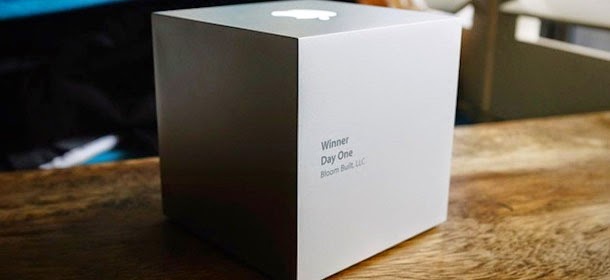
Past winners have included Paper by FiftyThree, Evernote, Cut the Rope, and Infinity Blade. App developers compete for the increased exposure and a glowing Apple logo trophy, as well as a comprehensive Apple goodie bag.
This year's winners range from an experimental literary puzzle game all the way to editing software that lets you create living photographs.
Storehouse – Visual Storytelling: a beautiful iPad app that lets users create highly visual and customized stories to share with people through Dropbox or Instagram.
 |
| image credit : storehouse |
Threes: It's all about finding combinations and factors of three in this addictive app. Its tagline is "A tiny puzzle that grows on you."
 |
| image credit: Threes |
Leo's Fortune: In this platform adventure game, you are responsible for Leo as he bounces, slides and floats his way in search of his stolen hoard of gold.
 |
| image credit: Leo's Fortune |
Monument Valley: This picturesque adventure game thrusts you into a world of impossible architecture that feels like a living M.C. Escher painting.
 |
| image credit: Monument Valley |
PanoPerfect: One of the two student winners of the Apple Design Award, PanoPerfect gives users a place to easily share their iPhone panoramas.
 |
| image credit: PanoPerfect |
Device 6: This narrative experience combines puzzles, thrillers and literature to create one of the most experimental apps we've ever seen.
 |
| image credit: Device 6 |
Yahoo News Digest: Last year, Yahoo won an Apple Design Award for its beautiful Yahoo Weather app, and the company did it again this year with a polished news reader.
 |
| image credit: Yahoo News Digest |
Day One: This journal app encourages you to treat it like a diary, making it easy to chronicle everything from major life events to the briefest encounters.
 |
| image credit: Day One |
Blek: In this mesmerizing game, you gesture to create a line that worms its way along, repeating its motion gracefully. Aim for colored dots, avoid the black ones.
 |
| image credit: Blek |
Teachley: Addimals Adventure: The second student winner is an educational app from Teachley that teaches fundamental strategies for addition in a colorful way.
 |
| image credit: Teachley |
Sky Guide: View Stars Night or Day: Just point your iPhone and iPad to the sky at night, and Sky Guide does the rest, highlighting constellations for you to discover.
 |
| image credit: Sky Guide |
Metal Framework Gives iOS A Lead In Gaming For Foreseeable Future

For those without a technical background, Metal offers developers a set of functions that are “closer to the metal” than OpenGL, the application programming interface traditionally used on iOS (and Mac, Android, and game consoles not made by Microsoft). That means that they have more direct control over the graphics hardware, enabling faster performance because there’s less overhead for the system to deal with.
In practical terms, this won’t mean much for most developers — only those who really need to get into the guts of their code to boost graphics performance need be concerned. But there’s an entire industry built up around creating “game engines” for developers so that they don’t have to rebuild the wheel every time they start a new project. Getting those developers interested is how Apple gets Metal into most iOS games.
As it turns out, some of those teams have already started building Metal into their engines. Yesterday, Unity3D rendering guru Aras Pranckevičius tweeted that building Metal into the company’s engine was the “fastest port to brand new 3D API ever”:
Playing around with Apple #Metal was super fun btw. Fastest port to brand new 3D API ever. #unity3d
— Aras Pranckevičius (@aras_p) June 2, 2014On his blog, iOS developers and startup consultant Nat Brown points out that this won’t mean that games aren’t going to be built for Android just because developers can get better performance on iOS through Metal. Most won’t even touch it, because it’ll be baked into the tools they use to make their games.But gamers might start to notice when games built for the platform start to offer significantly better graphics:
That said, of the class of very advanced programmers who will jump on Metal are… the teams that maintain the game engines, frameworks, and toolchains used by 95% (perhaps 99%) of the games for mobile. Unity3D, Unreal Engine, and a few others simply dominate mobile gaming on both iOS and Android and have traditionally targeted a relatively common core of OpenGL ES for both platforms.While there are equivalents of the Metal framework available on other platforms — Mantle on AMD-made graphics chips, and DirectX 12 from Microsoft for Windows and the Xbox platform — neither company has complete control of the ecosystem for which they are building, which complicates things and limits the extent to which they can optimize for specific hardware.
Due to this I find it unlikely that the API itself will act to lock anybody into iOS from a classic API perspective – everybody is using an engine or framework and indeed tools much higher up the value chain. But… Metal could very well offer an iOS performance lock-in on mobile.
After all, AMD makes a wide variety of graphics cores that can be used in a nearly infinite range of PC hardware configurations, while DirectX has to work with the same range of CPU, RAM, etc., while also accounting for graphics chips from AMD, nVidia and Intel.
That means these frameworks simply can’t optimize for specific hardware in the same way that Apple can, as Anandtech’s Ryan Smith noted this morning:
Of the other low-level APIs we’ve seen so far – AMD’s Mantle and Microsoft’s DirectX 12 – the former is an API established by a hardware vendor who has to ride on top of other companies CPUs and OSes, and the latter is an OS vendor who has to ride on top of third party CPUs and GPUs. Apple on the other hand is in the enviable position of being as close as anyone can be to offering a fully vertical ecosystem. Apple designs their own CPUs, configures their own SoCs, and writes their own OS. The only portion of the chain that Apple doesn’t control is the GPU, and even then the company has exclusively used Imagination Technologies’ PowerVR GPUs for the last 7 years with no signs of this changing.With the iPhone 5s, iPad Air, and iPad mini all running on the same A7 system-on-a-chip — and this year’s models presumably sharing the A8 — Metal can be optimized specifically for one set of hardware and get the same gains across its range of mobile devices.
While the diversity of Android handsets comes with its own advantages, Google simply can’t create a Metal equivalent that optimizes for every device manufacturer’s hardware. As gamers’ expectations for what their phones are capable of evolve, it’ll be interesting to see how the introduction of Metal shapes the mobile gaming landscape.
iOS 8 Update in Future Could Allow Users To Customize Control Center

It seems things may change with iOS 8, which is expected to hit the devices this fall. According to a new report, the future ios 8 update could give users the ability to customize the control center.
This means users will be able to change the order in which the icons are displayed. Users will also be able to select which shortcuts are displayed in the Control Center.
There’s no word if Apple will introduce the customizable control center in the iOS 8 update, but Hamza Sood, a Twitter user posted some screenshots which shows a rearranged Control Center, as well as a settings screen which lets users add/remove a specific application from the Control Center.
Other improved features introduced in iOS 8 includes improved notification center, access to recent contacts in the multitasking screen, ability to read and respond to messages/calls from iPad or Mac, improved spotlight search and much more.
We’ll update you as soon as we get more information about the customizable Control Center and if it will make its way to iOS 8. Until then a grain of salt is required. If you’re an enrolled developer using iOS 8 beta 1, share with us using the comments below if you spotted a new feature.
Advertisement
Advertisement